 ECOLYV
GBP Categories and Attributes: How to Get Matched to the Right AI Queries
By Hitesh Chauhan | Updated August 2026 | ~8 min read
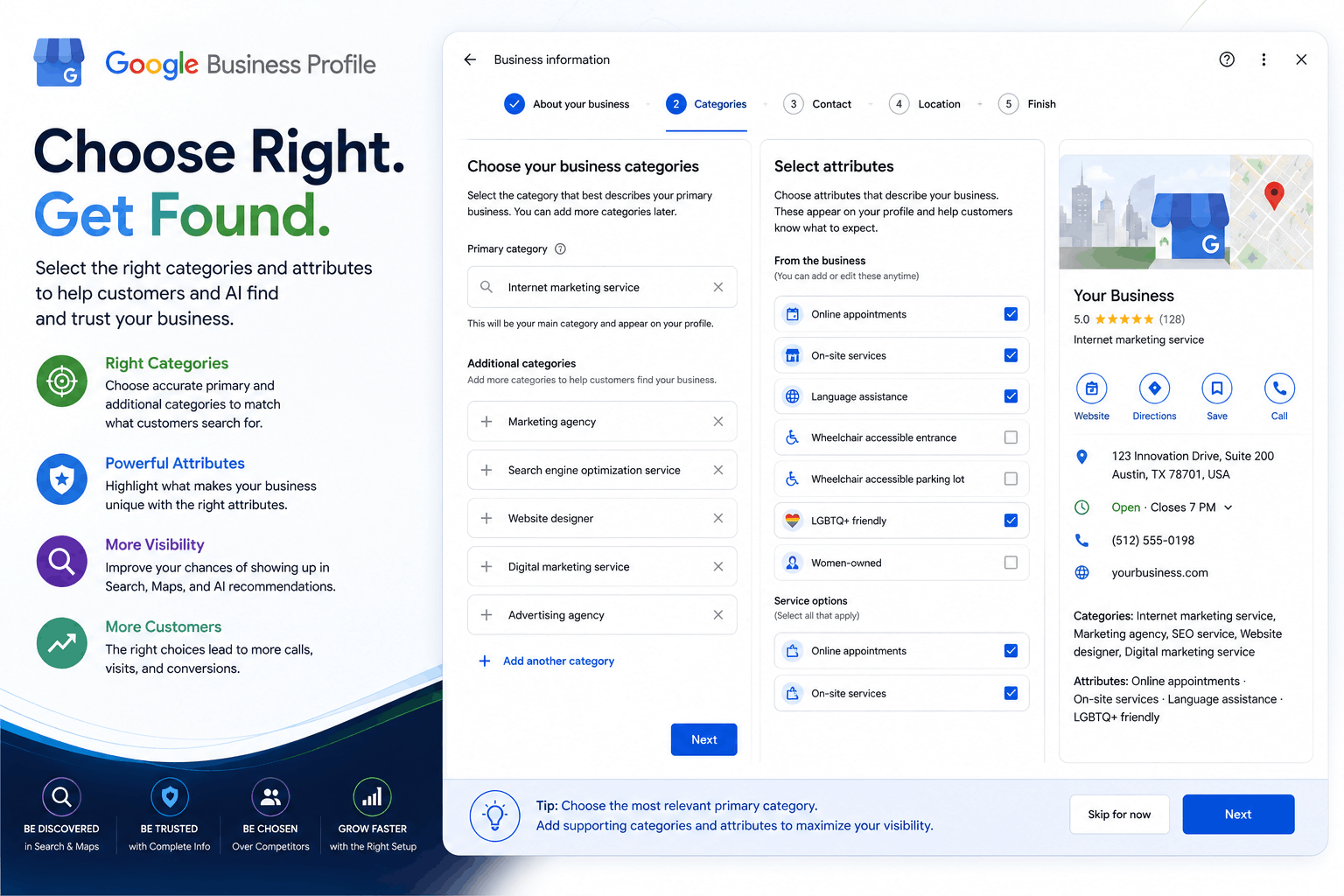
Quick answer: Google Business Profile categories and attributes determine which searches a business is eligible to appear in, both on Google and inside AI-generated answers. The primary category carries the most weight, secondary categories broaden relevant matches, and attributes add specific details AI engines use to answer highly targeted customer questions. Getting these right matters more than almost any other field on the profile.
Why Categories and Attributes Matter More Than Most Businesses Realize
Category selection influences roughly 17 percent of local visibility on its own, making it one of the single highest-impact fields on the entire Google Business Profile, according to 2026 industry benchmarking data. Attributes carry less individual weight but still shape whether a business gets matched to specific, intent-driven searches such as "dentist that accepts walk-ins" or "restaurant with outdoor seating near me."
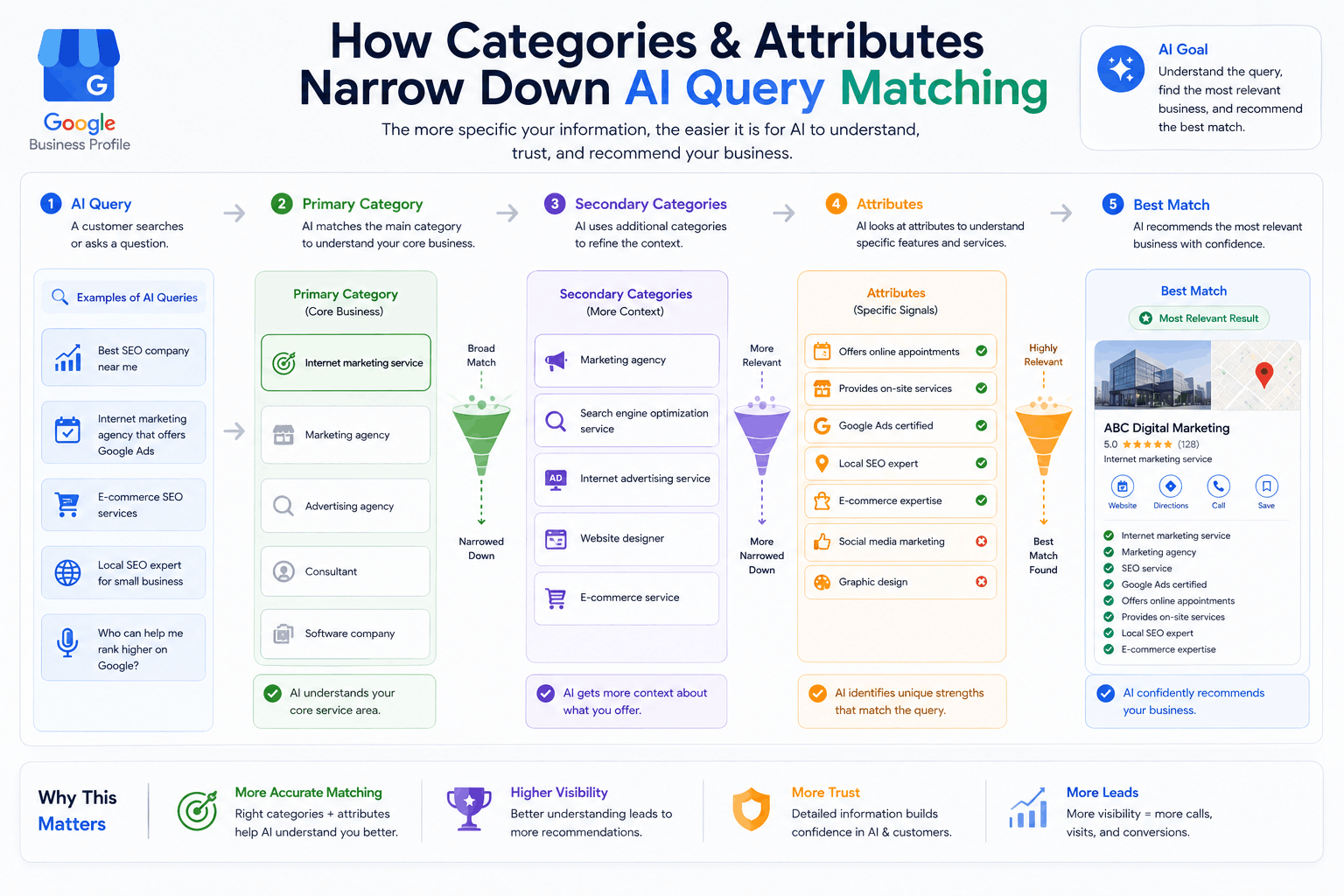
For AI engines, this matters even more than it does for traditional search rankings. When someone asks an AI assistant a specific question, the AI is not just looking for a business in the right industry. It is looking for the business whose structured data most precisely matches the details of the question being asked. A vague or incorrect category makes that match far less likely, regardless of how good the business actually is.
Primary Category vs Secondary Categories
The primary category defines the core identity of the business in Google's system and carries the most ranking weight of any category field. It should describe what the business fundamentally is, not everything it happens to offer.
Secondary categories describe additional, genuinely relevant services and help the business appear in a broader set of related searches. They carry less individual weight than the primary category, but a well-chosen set of secondary categories still meaningfully expands which queries a business can match.
A common mistake is treating secondary categories as a way to appear in as many searches as possible. Adding categories that are only loosely related to the actual business tends to dilute relevance signals rather than strengthen them, and can confuse AI engines trying to determine what the business genuinely specializes in.
How to Choose the Right Primary Category
- Search the exact terms customers use. Type the phrases real customers would search, not internal business jargon, and see what category Google suggests for similar listings.
- Check competitor categories. Look at well-ranking competitors in the same market and note which primary category they use, without copying blindly.
- Choose the most specific accurate option. Google offers thousands of category options. A specific, accurate match, such as "Emergency Dental Service" instead of a generic "Dentist," gives both search and AI systems more to work with.
- Avoid switching categories frequently. Google needs time to re-evaluate a profile after a category change, and rankings tied to the previous category may dip temporarily during that adjustment.
Choosing Secondary Categories Without Diluting Relevance
- Only add a category if it represents a real, standalone service the business offers, not something adjacent or aspirational
- Prioritize categories customers are actually searching for over categories that simply sound impressive
- Review secondary categories periodically as the business's actual services change, rather than leaving them untouched for years
Attributes: The Detail Layer AI Engines Rely On
Attributes are specific, selectable details, such as wheelchair accessibility, free Wi-Fi, online booking, or outdoor seating. Individually, they carry less ranking weight than category selection, but they solve a different problem entirely: they give AI engines the specific detail needed to answer a narrow, intent-driven question.
When someone asks an AI assistant "which coffee shops near me have outdoor seating and are dog friendly," the AI is not evaluating general reputation. It is filtering for two specific attributes. A business without those attributes correctly marked, even if it genuinely offers both, is unlikely to be recommended, simply because the AI has no structured way to confirm it.
Comparing Categories and Attributes
| Field | Purpose | Ranking Weight | Best Practice |
|---|---|---|---|
| Primary category | Defines core business identity | Highest | Choose the single most accurate, specific option |
| Secondary categories | Broadens relevant matches | Moderate | Add only genuine, standalone services |
| Attributes | Adds specific, filterable details | Lower individually, high for specific queries | Complete every attribute that genuinely applies |
Common Mistakes With Categories and Attributes
- Choosing a broad, generic primary category when a more specific option exists
- Stacking secondary categories that only loosely relate to the actual business
- Leaving attributes blank instead of taking a few minutes to complete them
- Changing the primary category frequently based on short-term ranking experiments
- Never revisiting category and attribute selection as the business evolves
A Simple Example
Consider two hair salons in the same neighborhood. Salon A lists its primary category as the generic "Beauty Salon" and has left every attribute field blank. Salon B lists its primary category as the more specific "Hair Salon," adds "Nail Salon" as a genuine secondary category since it also offers manicures, and completes attributes for online booking and walk-ins welcome.
When someone asks an AI assistant "hair salon near me that takes walk-ins," Salon B has both the specific category and the exact attribute the query is filtering for. Salon A, despite potentially offering the same walk-in service, has given neither Google nor the AI any structured way to confirm it.
How This Connects to the Rest of Your Profile
Categories and attributes work best alongside the other core elements of a complete profile. For a full breakdown of everything else that matters, including descriptions, hours, photos, and reviews, see our complete guide to Google Business Profile Optimization. Once the profile itself is fully optimized, the same accuracy and specificity should extend to the website content covered under Answer Engine Optimization, since AI engines cross-check the two against each other.
Frequently Asked Questions
What is the difference between a primary and secondary GBP category?
The primary category defines the core identity of the business and carries the most ranking weight. Secondary categories describe additional services offered and carry less weight individually, but still help match the business to a wider range of relevant searches.
How many categories should a Google Business Profile have?
There is no fixed ideal number, but accuracy matters more than quantity. A business should add every category that genuinely describes a core service and stop there, rather than adding loosely related categories in an attempt to appear in more searches.
Can changing a GBP category hurt existing rankings?
It can, temporarily. Google needs time to re-evaluate a profile after a significant category change, and rankings for queries tied to the old category may dip during that adjustment period. Changes should be made deliberately, not experimentally.
What are GBP attributes and why do they matter?
Attributes are specific, selectable details such as wheelchair accessibility, online booking, or outdoor seating. They give both customers and AI systems granular information beyond the basic category, which helps match a business to more specific, intent-driven queries.
Do attributes affect AI search visibility the same way categories do?
Attributes carry less overall ranking weight than category selection, but they still matter for AI search, since AI engines often need a specific detail, such as accepts walk-ins or offers free parking, to answer a highly specific customer question.
How do I know if my current category is wrong?
Search for the exact terms customers would use to find the business, then check whether Google's suggested category list for that search matches the current primary category. A consistent mismatch is a strong signal the category needs to be corrected.
Key Takeaways
- Primary category selection carries the most ranking weight of any single field on a Google Business Profile.
- Secondary categories should only include genuine, standalone services, not loosely related additions meant to appear in more searches.
- Attributes matter most for narrow, intent-driven AI queries, since they give AI a specific, filterable detail to match against.
- Category changes should be made deliberately, since Google needs time to re-evaluate a profile afterward.
- Categories and attributes work best as part of a fully completed profile, not as an isolated fix.
About the Author
Hitesh Chauhan is the founder of Ecolyv and has spent 5+ years working across IT, SaaS, and cybersecurity content, helping businesses get found through Google Business Profile optimization and, more recently, AI search visibility. He writes Ecolyv's AI Search Optimization guides based on what is actually working for clients, not general theory.
Not Sure Your Categories Are Working For You?
Book a free strategy call with an AI visibility expert. We will review your current category and attribute setup and show you exactly what to fix first.